


Views and display settings
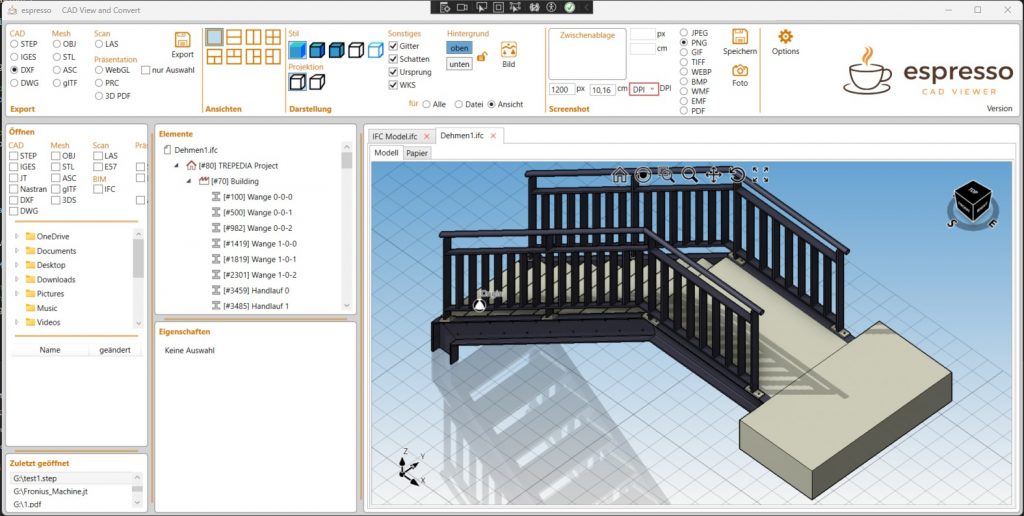
Multiple files can be opened simultaneously. A file can be displayed in multiple views. Each view can be individually customized with regard to rendering mode, viewing angle, or background. Background images are also possible.
Element information
Depending on the file format, the drawing elements are displayed differently in a tree structure.
All properties of the selected element are listed below.
An element selected in the structure is highlighted in the 3D model and vice versa.
You can hide or highlight elements.
Snapshots
A 2D image can be generated from any view. Regardless of the size of the view, the output formats can be specified in pixels and centimeters according to your chosen DPI setting.
The files can be saved in many bitmap formats or as PDF.
Drawing derivation
A highlight is the automatic generation of views from a 3D model. All 6 possible views as well as an isometric view can be arranged on a drawing sheet. Optionally, hidden lines can be displayed.
Dimensions can be added with object snap points.
Drawing frames with individual title blocks can be used.
The views generated in this way can be printed or saved as PDF files. Alternatively, they can also be exported as DXF/DWG files so that these views can be further edited.
File formats and conversion
The espresso CAD viewer can read and write a variety of 2D and 3D file formats.
It is possible to open a file and convert it to another format.
| Category | File format | Read | Read |
|---|---|---|---|
| CAD | DXF / DWG | X | X |
| STEP | X | X | |
| IGES | X | X | |
| JT (<9.5) | X | ||
| Nastran | X | ||
| Mesh | OBJ | X | X |
| STL | X | X | |
| ASC | X | X | |
| glTF | X | X | |
| 3DS | X | ||
| Scan | LAS | X | X |
| E57 | X | ||
| BIM | IFC | X | X |
| Presentation | DWF | X | |
| SVG | X | ||
| X | |||
| WebGL | X | X | |
| PRC | X | ||
| 3D PDF | X |